Sticky notes that stay put.
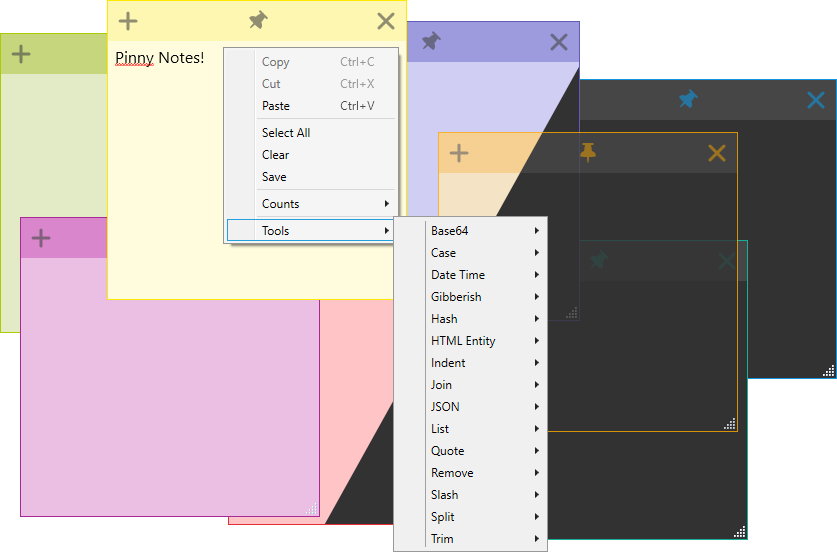
Pinny Notes is a free, open-source sticky notes app for Windows. Pin notes above every other window, and reach a set of handy text tools from the right-click menu.
Latest release · Windows · Free & open source (GPL v2)
Features
Small, quick, and full of options for the way you work.
Always on top
Pin a note and it stays visible above all other windows.
Reminders
Set a time and the note will come back to get your attention.
Colours & dark mode
Pick from several colours or let new notes cycle through them. Dark theme included.
Auto save
Notes save as you type, so nothing gets lost.
Smarter copy & paste
Trim on copy/paste, middle-click paste, Ctrl+click copy and auto copy on highlight.
Transparency
Make notes semi-transparent so you can still see what's behind them.
Block minimising
Keep notes on screen even when you press Show Desktop.
Tray icon
Bring every note to the front or open a new one from the system tray.
- Customisable title bar to fit your needs.
- Start position: choose where on screen new notes open.
- No-selection copy: copy the current line, the whole note, or nothing.
- Triple-click selects the line; quadruple-click selects it ignoring wrapping.
- Tab to indent selected text.
- Auto indent new lines to match the previous one.
- Ends with new line: notes always finish with a newline.
- Auto scroll keeps the last line visible while pasting.
- Spell checking built in.
- Counts menu for lines, words and characters.
- Note visibility: show or hide notes in the taskbar and task switcher.
- Lock text to make a note read-only until unlocked.
Built-in tools
Select some text, right-click, and transform it without leaving the note.
Encode and decode Base64
Add or remove (), [] or {}
Lower, upper or proper case
Convert between RGB and HEX
Current date, sortable format, week number
Words, sentences, paragraphs, names
Generate GUIDs / UUIDs
MD5, SHA1, SHA256/384/512
Encode and decode entities
Indent with 2/4 spaces or tabs
Join lines with commas, spaces or tabs
Prettify JSON
Number, bullet, sort or unlist lines
Add or remove ' " or ` quotes
Strip whitespace, slashes or repeated text
Toggle or remove / and \
Split by commas, tabs, spaces or patterns
Trim lines or remove blank lines
Encode and decode for URLs
Download
Pinny Notes runs on Windows. Pick the installer or the portable version.
Looking for older versions or the changelog? See all releases.
Support development
Pinny Notes is built in my spare time. If you find it useful, a donation or sponsorship is very much appreciated.
You can also help by reporting bugs and suggesting features, or contributing.